
- DOCUMENTATION & GUIDELINES -
The GoodbyeMatrix Sovereigns App!
Your Network for Absolute Freedom & Independence
What is the Sovereigns App?
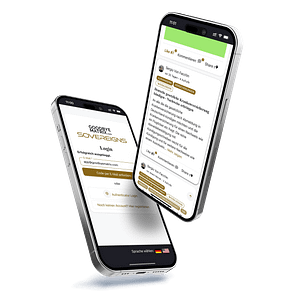
The Sovereigns App is the virtual meeting point for sovereign individuals who live the Flag Theory or wish to implement it in their lives. It brings together location-independent entrepreneurs, digital nomads, perpetual travelers, investors, and those aspiring to join their ranks. Instead of managing a thousand different forums, we provide 7 hand-picked topic areas that cover exactly what truly matters—guaranteeing efficiency and focus.
What does the Sovereigns Community offer you?
Who has Access to the Sovereigns App?
Access to the Sovereigns App is intentionally limited and exclusive. During the beta phase, we are opening the doors exclusively for our community—individuals who are already part of the GoodbyeMatrix family and are ready to take their freedom to the next level.
This includes members of the GoodbyeMatrix Club, our consulting clients, CBI investors, founders of US LLCs and Canada LLPs, seminar participants, and graduates of our Travel Hacking Masterclass.
This exclusive access ensures a private circle of entrepreneurs, investors, and perpetual travelers who support one another and move forward together. Here, you will find only like-minded individuals who are serious about their goals and actively working on their freedom. No unwanted outside interference, no spectators—only real action-takers who are focused on execution.
Full Concentration on the Sovereigns App
Sergio von Facchin and the entire GoodbyeMatrix team are now shifting their complete focus to our Sovereigns App. While existing groups on other social networks will remain, we will no longer provide active support on those platforms. Our energy and support are now channeled exclusively into our own network.
If you are looking for direct contact with Sergio von Facchin, there is only one way: The Sovereigns App. This is where we are available for you, helping you take your life and your freedom to the next level.
Use the Sovereigns App on All Devices!
The GoodbyeMatrix Sovereigns App is a Progressive Web App (PWA). It is completely independent of all app stores and can be installed as a standalone application without sacrificing the benefits of a standard app.
You will not find this app in the usual app stores. Instead, you can access the app through the following website and install it on all your devices (iOS, Android, Windows PC, etc.) directly via your web browser.
Text Instructions
- Open your web browser: Launch Safari (recommended for the best experience) or Brave.
- Visit the site: Go to https://app.goodbyematrix.com/
- Tap the Share button: This is the square icon with an upward arrow at the bottom of your screen.
- Add to Home Screen: Scroll down the list of options and select “Add to Home Screen.”
- Confirm: Tap “Add” in the top right corner. Done! The app icon will appear on your home screen. You can now open and use it just like any other app.
Text Instructions
- Open your web browser: Launch Google Chrome or Brave.
- Visit the site: Go to https://app.goodbyematrix.com/
- Open the menu: Tap the three dots (icon) in the top right corner.
- Add to Home Screen: Select the option “Add to Home Screen” or “Install App.”
- Confirm: Tap “Install” and confirm the installation. Done! The app icon will be added to your device, and you can open and use it just like any other app.
The Sovereigns App can also be installed and used as a standalone application on your PC.
- Open your web browser: Launch Google Chrome or Brave.
- Visit the site: Go to https://app.goodbyematrix.com/
- Sign in: Log in to the app with your user account.
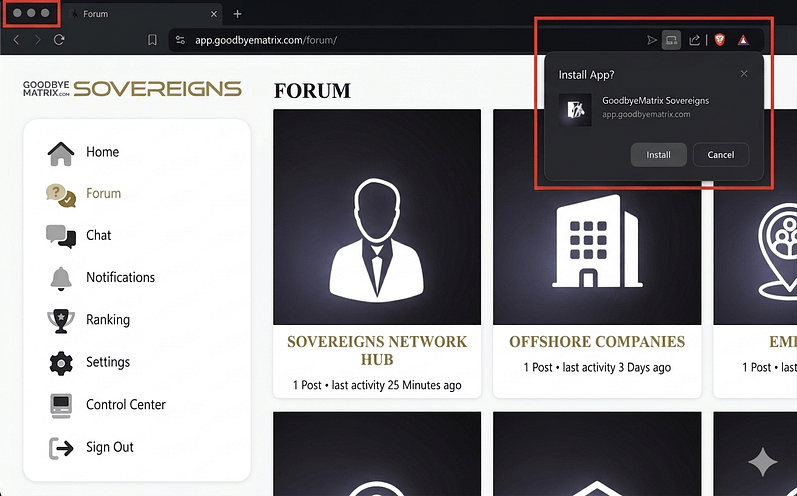
- Click the Install icon: Click the small "Laptop/Computer icon" located in the address bar (next to the URL).
- Confirm: Click “Install” to finish.
- Done! The app icon will be added to your PC, and you can open and use it just like any other application.
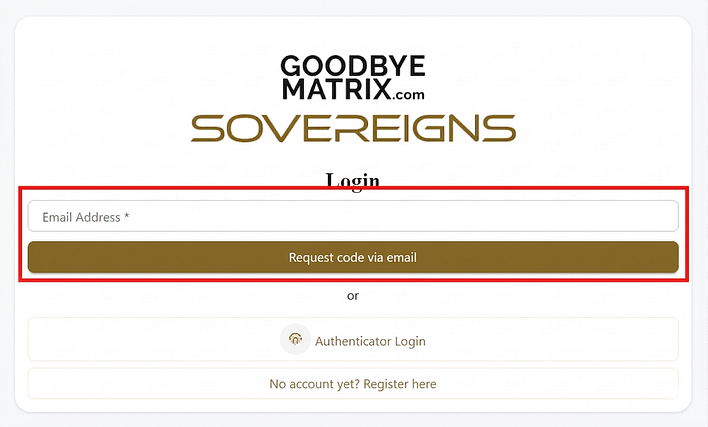
For your first login, you must enter the email address associated with your account and request a one-time PIN (code) via email.
After a successful login, you will be guided through a simple and intuitive step-by-step configuration setting, where you can enable login via fingerprint or Face ID.
Step-by-Step Setup Guide
After a successful login, you will be presented with a simple and intuitive step-by-step Setup Guide. Here, you can define the basic settings for the app. All of these settings can be adjusted at any time later under the "Settings" menu item.
Below, you will find more details about the six steps of the Setup Guide:
This step is an alternative method to install the app on PC or Android devices. You can use either the steps explained above (outside the app) or this option (inside the app). The final result is the same; there is no difference.
Simply click on "Install Shortcut" and confirm the app installation. That's it!

The Sovereigns app currently has primarily German-speaking users, but the app was developed to welcome international users in the future as well.
These settings control which posts are displayed to you. For example, if you deactivate the German language, no German posts will be shown to you.

⭐️ Benefit
All chats and forums are automatically translated between German and English. This ensures you never miss a message, important information, or a valuable discussion, regardless of the language used.
This step is very important!
We recommend that you activate "Push Notifications" for the Sovereigns App on your devices. This way, you will be notified whenever new posts or comments are made in the topics or forums you follow. This means you won’t have to manually log into the app to check for updates!

Enable Notifications on Safari (iPhone)!
If you have installed the Sovereigns App via the Safari browser, please make sure to enable push notifications in the Safari settings:
Instructions for iPhone and Sovereigns App installation via Safari browser:
1. Open Settings on your iPhone.
2. Scroll down until you see the Safari app and click on it.
3. Then click on Advanced.
4. Open the Feature Flags tab.
5. Enable the Notifications toggle.
Once you have also activated the notifications within our settings in the Sovereigns App, push messages will now function without any issues.
If you do not enable push notifications in your browser settings, you will receive NO notifications. This is why this step is extremely important. This also applies if you use a different browser for installation, such as Brave or similar. On a desktop PC, you must also enable push notifications in your browser settings.
Instructions for iPhone and Sovereigns App installation via Brave browser:
1. Open Settings on your iPhone.
2. Scroll down until you see the Brave app and click on it.
3. Click on Notifications.
4. Enable the Allow Notifications toggle.
Once you have also activated the notifications within our settings in the Sovereigns App, push messages will function without any issues.
If you used a different browser to install the Sovereigns App, you must perform these steps for that specific browser as well. On a desktop PC, you must also enable push notifications in the settings of your respective browser so that messages can be displayed there.
Firefox (on Windows) as follows (with the app open in the browser):
- Click the lock icon
- "Select "Connection secure" and then click "More Information". In the window that opens, go to the Permissions tab and find "Send Notifications"
- In the window that opens, go to the Permissions tab and locate "Send Notifications"
- Uncheck "Use default" and set the selection to "Allow"
- Close the window
In this step, you can activate all topics and forums that interest you. This ensures that new posts or comments on these topics are displayed in your feed on the homepage and a push notification (Step 3) is sent to your device. This way, you stay up to date on all topics relevant to you!

In this step, you can activate login via fingerprint, Face ID, and/or Passkey on your devices. This allows you to log into the Sovereigns App quickly and easily at any time to exchange ideas with like-minded people.
Simply enter any name of your choice for your device in the field and click "Add Device."
The available options for your device—such as Fingerprint, Face ID, and/or Passkey—will then be displayed for you to activate. That's it!

In Step #6, you can upload a great photo for your profile. We highly recommend using a photo of yourself so the community can get to know you better and feel like they are connecting with a real person.

Once you have completed the 6-step configuration wizard, you can navigate to 'Settings' at any time to update these options as needed.
The Sovereigns Network Hub
Your network is your most important asset.
It is the key to both personal and professional success. A strong network opens new doors, offers valuable support, and expands your horizons. Build and expand your network continuously, as the relationships you establish can provide immense value in unexpected moments.
The Sovereigns Hub offers you the premier opportunity to connect with like-minded individuals in a secure, private space.
This is where our entire community network converges, allowing you to tap into its collective potential. Introduce yourself and share your story. Showcase yourself and your business—what can you offer the community? We are here to support one another. Share your successes with us! Whether you are looking for a place to stay or wish to offer a bed to fellow members, hosting or attending local meetups, or making the right contacts on the ground—it all happens here.
Enjoy your networking!
Networking & Business Opportunities
Your Network is Your Capital
Success Through Connection!
In the Sovereigns App, everyone is on a similar journey—location-independent entrepreneurs, digital nomads, and investors seeking not just freedom, but growth. The app provides the opportunity to connect with like-minded individuals who share your vision and operate on the same level. This is more than just networking; this is where real business opportunities are born.
Through this app, you gain access to a network that would otherwise remain hidden. Use it to take your business to the next level!
GoodbyeMatrix Sovereigns App vs. Traditional Social Networks
Feature | GoodbyeMatrix Sovereigns App (PWA) | Major Social Platforms | Popular Chat and Community Platforms |
|---|---|---|---|
Security & Data Sovereignty | Complete independence from third-party platforms, with data hosted on private servers and secured by blockchain backups. No external data sharing by us. | User data is regularly shared with third parties or used for advertising, often with security vulnerabilities. | User data can also be shared with third parties; no complete control over personal content. |
Algorithm-Free Communication | No Algorithms: All posts are treated equally; no shadowbanning, no preferential treatment by algorithms. | Strong algorithm that decides which content is visible, usually depending on interactions or advertising budget. | Content can be heavily controlled by moderation or platform settings. |
Privacy & Deletion Protection | Complete control over all content. No possibility of content being deleted or censored by external actors. Naturally, we reserve the right to remove content if it violates our own guidelines or is illegal. | Content can be deleted at any time or restricted due to platform policies or changes. | Content can be deleted by administrators or moderators; the platform can remove channels. |
Clarity & Focus | Only 7 hand-picked forums in the field of Flag Theory, ensuring efficiency and clarity—tailored exactly to the needs of the community. | Often overloaded structures with many irrelevant discussions and groups that obscure the essentials. | Many channels and groups that can easily become chaotic, depending on server size and moderators. |
Community & Networking | Closed, exclusive community of highly qualified members working toward common goals (Flag Theory, tax optimization, asset protection). | Very large, heterogeneous communities, often with superficial interactions and without targeted networking. | Good networking in niches, but no closed society with a common strategic alignment. |
Ad-Free Experience | 100% ad-free, with no commercial distractions or tracking by third-party advertisements. Naturally, we mention our own products or our own verified implementation network. | High advertising flood in the form of personalized ads, often based on user behavior. | No direct advertising, but often sponsorships and advertising bots that appear in channels. |
Independence from App Stores | Progressive Web App (PWA) that functions independently of app stores. Installation directly via the browser; however, it will soon also be listed in the app stores while remaining independent of them. | Installations usually only via app stores, with the associated privacy and access conditions. | App store dependent, installation required, less flexible than a PWA. |
Business & Investment Opportunities | Focus on exclusive business opportunities and investments. Members receive access to special deals and investment opportunities through trusted sources. | No targeted support for investments or business development, except in private groups. | Good networking in niches, but no focus on exclusive business opportunities or investment chances. |
Ranking, Points & Prizes
Your commitment pays off!
In the Sovereigns App, you are rewarded for your activity in the forums, your contribution to community knowledge, and your interaction with other members. Earn points by:
The more you post, the higher you rise in the ranking. But it’s not just about status—you can also exchange your points for exclusive rewards. Every month, we raffle off attractive prizes among the top participants, such as:
Show what you're capable of and take the opportunity to establish yourself as a leading member of the community!
The Sovereigns App in Detail
On the app's homepage, you will find the following elements:
- My Feed: This is the default page displayed after logging in. Here, you see all new posts or updates from forums you follow.
- News: In this section, only posts and updates from the GoodbyeMatrix team are posted, such as upcoming live events, news, or important app updates, etc.
- Explore: In this section, you will find current posts and news from forums you do not actively follow and therefore do not receive notifications for. The idea is for you to go on a "discovery tour" to find potentially interesting posts.
- Search: The search field will help you find posts based on a specific term.
The forum is structured into seven main forums covering the most important aspects of Flag Theory.
The goal is to keep the forum as clear and compact as possible to ensure maximum user-friendliness.
Important: Please make your posts in the corresponding subforums. If no suitable subforum exists, the post should be placed in the main forum. Anything that cannot be clearly categorized belongs in the Off-Topic forum.
How to make your posts (discussions or questions) in the app:
- If you are on the homepage and want to make a new post from there, you must select the appropriate main and subforum where your post should appear.
- If you are already within a forum or subforum, it will be automatically selected for making your post.
- You have the choice between Questions and Discussions.
- You have the option to add images and tags to your post.
- Finally, you must mark the correct language (German or English) of your post.
- When your post is ready, simply click "Create." That's it!
The group chat serves as a platform for discussions, questions, and general exchange between participants. It is especially useful for short inquiries that are not suited for a detailed post in the forum.
The ranking is a reward system for our community!
It includes monthly and annual rankings based on accumulated points. These points are awarded for valuable posts and comments, with strict quality criteria in place to prevent mindless posting. The focus is on members providing constructive posts, sharing knowledge, and helping others.
Send us a review via the app and potentially collect up to 10 bonus points.
For those at the top of the rankings, there are attractive monthly and annual prizes!
This system is designed to promote the quality of posts and reward active, helpful members. At the same time, it encourages long-term participation within the community.
Sovereigns App Access as a Club Member!
The GoodbyeMatrix Sovereigns App is your daily tool to communicate, learn, and grow with like-minded individuals. However, to unlock its full potential, Club Membership is the key.
The GoodbyeMatrix Club offers you not only access to the app but also to live events, personal support, and a network of experts that helps you take your international plans to the next level.
Only together—the Club and the App—enable you to get the maximum out of your journey toward global freedom.
GoodbyeMatrix Club - Pillar I
Exclusive Events, Mentoring, Insider Knowledge & Network
GoodbyeMatrix Sovereigns App - Pillar II
Daily Networking, Operational Planning, Continuous Knowledge Exchange
Goal – Combination of Both Tools
Global Freedom, Financial Independence, Tax Benefits, Asset Protection
FAQs on the Sovereigns App & GoodbyeMatrix Club
The Sovereigns App is an exclusive platform for location-independent entrepreneurs, digital nomads, investors, and perpetual travelers. It provides you with access to strategic knowledge regarding Flag Theory, tax optimization, asset protection, and international business structures. The app connects you with like-minded individuals within a closed community and forum.
In the Sovereigns App, you can earn points through active and high-quality participation—for example, by making valuable posts, answering questions, or organizing events. These points not only increase your rank within the community but can also be redeemed for exclusive rewards such as prizes.
The Sovereigns App offers the highest security standards. Your data is hosted on our own secure servers and protected by blockchain backups. There is no external data sharing, and your content remains under your control. Unlike other platforms, no data is used for advertising purposes. Currently, only your email address, first name, and last name are stored in the app—and you even have the option to change your name at any time.
Currently, access to the Sovereigns App is possible as a GoodbyeMatrix Club member or for other selected GoodbyeMatrix clients. Club membership is the most affordable way to access the app and provides you not only with app access but also with exclusive events, personal support, and insider knowledge. Club membership involves an annual fee, which secures full access to all GoodbyeMatrix Club offers and currently includes the app as well. Become a Club member here >>
To gain access to the Sovereigns App, you must be a GoodbyeMatrix Club member. Joining the Club grants you access to the app as well as Club programs, exclusive events, and much more. Become a Club member here >>
The GoodbyeMatrix Sovereigns App is a Progressive Web App (PWA) and works on all standard devices, including iOS, Android, Windows PC, and Mac. You can access and install it via your web browser—without needing to go through the App Store. In the future, however, the app will also be listed in the official App Stores.
Unlike conventional social media platforms, the Sovereigns App does not use algorithms that restrict your visibility, and there is no third-party advertising. Everything you see in the app is determined by you. Content is not censored or deleted (unless it violates our guidelines, is spam, or is illegal), and there is no external data sharing. You are part of a closed, exclusive community working toward common goals.
The app includes an intuitive step-by-step onboarding guide to assist you with the initial setup. Should you still have questions, you can contact support at any time or check the help forum, where the community is available to assist you.
The Sovereigns App focuses on 7 hand-picked forums covering all aspects of location-independent living, investing, and Flag Theory. These include:
- Sovereigns Network Hub (Networking and exchange)
- Emigration (Strategies for relocating abroad)
- Foreign Companies (Formation and operation of offshore companies)
- Wealth & Investments (Investment opportunities and asset protection)
- Citizenships (Citizenship by Investment, second passports)
- Lifestyle (Location-independent lifestyle, tips, and experiences)
- Off-Topic (Other topics)
© 2026 Goodbye Matrix International LLC. All rights Reserved